|
|||||
|
|||||
|
|||||||||||
|
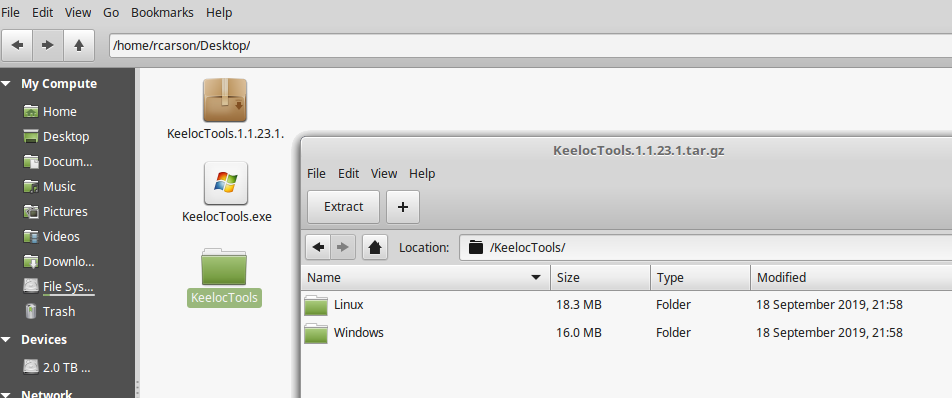
The ESP8266 wireless Wifi system on a chip and discrete suport module is a very cheap and affordable platform to develop IP around. Unfortunately, the ESP8266 has no way to provide protection from being copied. Worst case you can do a memory dump and/or flash dump with esptools and read the running code, which would provide a intellectual thief about 10 seconds to copy your hard work in development to be cloned thereafter. Even outside of this serial port interaction a hacker could actually pry the top off the RF shield and remove the serial flash and read its unencrypted contents with a flash reader/programmer tool. Enter KeeLoc with your solution to protect your intellectual property from cloning. We provide a special bootloader and tools to encrypt your firmware binary to a targeted binary, that will only work on that one ESP8266 device you program in manufacturing. If a hacker tries to copy the flash contents to another ESP8266 it will fail because the uniquely derived AES key (With things like its unique chip ID) will not match the encrypted flash contents for another device. Your firmware binary is not shared with our server. How it works is that you will put your unencrypted binary in rom0 directory of our tools folder and also plug your ESP8266 with USB cable to the PC. When our script is ran it will query the ESP8266 on important chip security parameters send this to our server. We will then generate a unique AES key and return this to the application so that it can then do a local AES encode of your firmware binary. This will then automatically be programmed into your ESP8266 flash. When done your firmware will now be AES protected. The encrypted flash will only decode the flash to internal ram of the microprocessor with our bootloader at boot up. We provide some further information of this process and other things that can be done to further code protect your product firmware later on this page, like how to shut down the serial port from reading, to prevent access to internal memory with esp8266 tools. Using our software to protect your ESP8266 is unbelievably easy. Let's start with the tools you can download here: Click to Download Self Extracting Keeloc Tools for Windows Click to Download Keeloc Tool Compressed tar.gz for Linux You will have the option to download the KeelocTools archive tar or the KeelocTools.exe self extracting zip file for windows. Extract and it will give two options subfolders as subdirectories. |
|
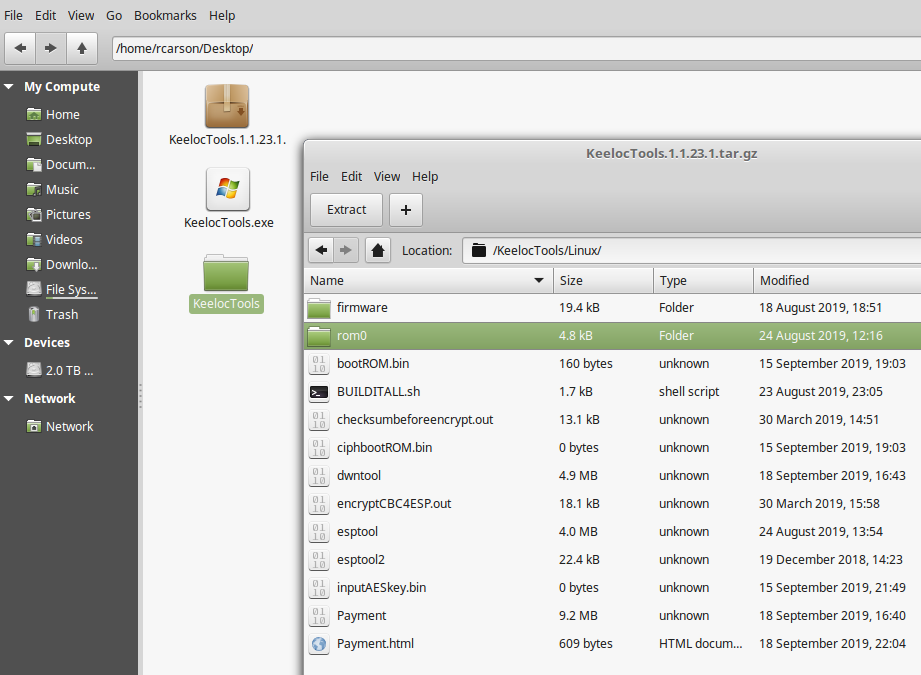
One subfolder for Linux and the other for Windows, descending down into the Linux folder we see, all the tools required to create and load your encrypted version of firmware. The two things of emphasis in this folder are the rom0 directory and the BUILDITALL.sh (BUILDITALL.bat on windows platform). The rom0 directory is where you put your generic firmware that you want to encrypt protect. By running BUILDITALL in a command or shell. You will be able to contact our servers. If there is adequate credit ($1.25/per encrypt we explain how to add funds to your account later) then our servers will be contacted for a AES key. This protection key will then be returned to your local execution and your rom0 binary then will be AES encrypted and finally the esptool will be invoked to load our bootloader along with the encrypted firmware to the flash of the ESP8266. Upon next reset of the ESP8266 device, your firmware will be ran encrypted. |
|
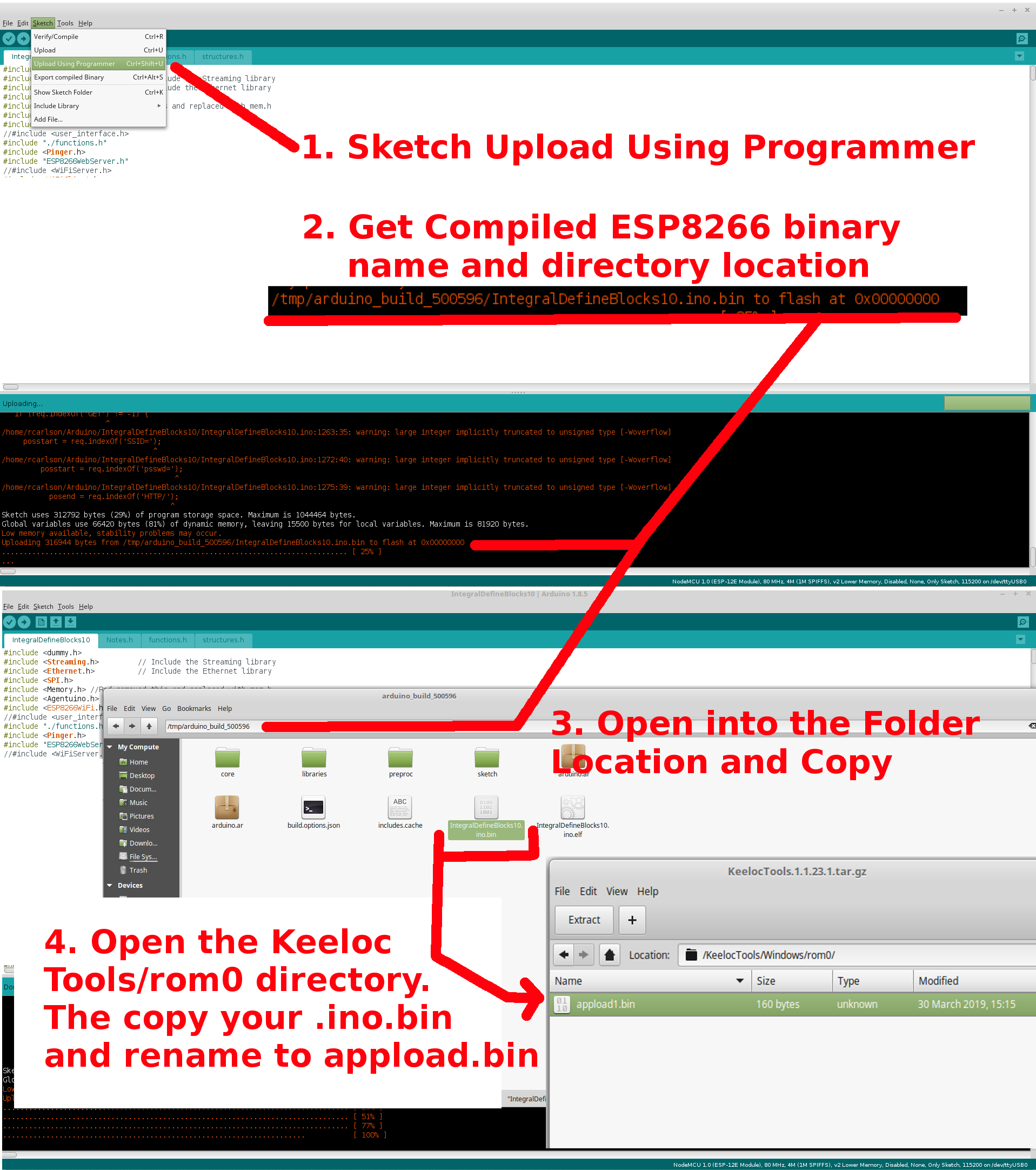
If you don't know how to find your binary and are using Arduino as your compiler. You can use Sketch->Upload Using Programmer after compiling. This will provide you the location of your binary in the lower pane window of the Arduino programmer as shown in the screenshot below. Using this location go to that file location. The copy the *.ino.bin file with the * being your name of project. Finally open the KeelocTools/Linux/rom0 and paste and rename it appload1.bin as shown below. appload1.bin is what our scripts and programs will use as your unencrypted source to be encrypted. |
|
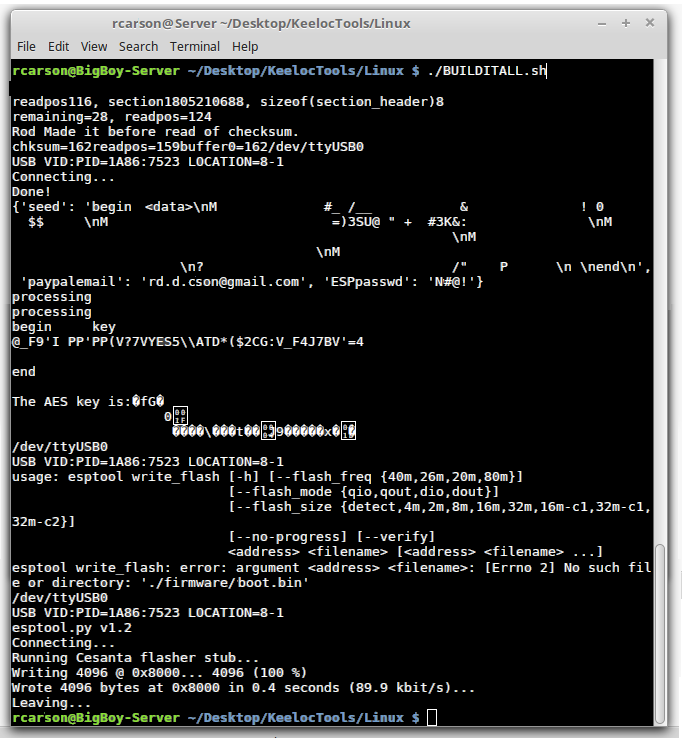
Next just run the ./BUILDITALL.sh from a terminal in linux or ./BUILDITALL.bat for windows to begin the process of AES encrypting and loading into the ESP8266. The terminal or command prompt will show this: |
|
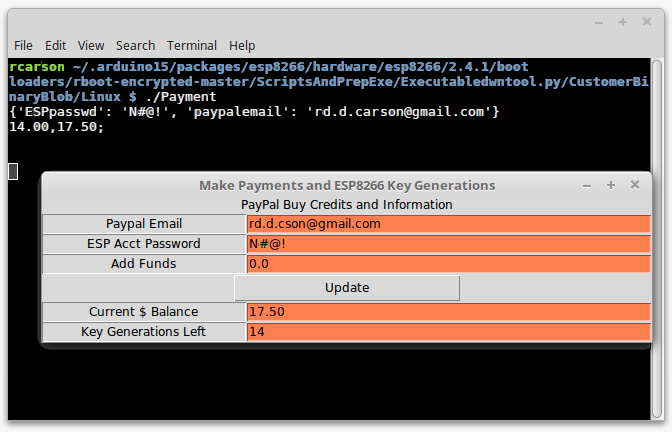
Obviously there are a few other important steps not shown in the above instructions. One being the need to add funds ("Current Balance" = 0) first to an account before you can run the ./BUILDITALL. To add funds or check balance type ./Payment. In particular you will see a dialog box appear. Here is where you will need to enter you "paypal email" and a "ESP Acct Password". If you have $0.00 in current balance then "Add Funds" and click "Update" it will simply backup the "Paypal Email" and "ESP Acct Password" so that everytime you open the "Payment" Dialog again it will come up with that paypal email and password as the default thereafter. If you put any positive amount above $0.00 in "Add Funds" and hit Update it will contact Paypal to let you add funds to your account. It's very IMPORTANT to have the "ESP Acct Password" not be your Paypal Email login Password and it must be the same one as your payment for usage and deductions. Don't update "ESP Acct Password" with something you didn't add funds prior with also. As this password is for our local accounting to know when you added funds it's the same password as the one you want to use funds from on our servers. |
|
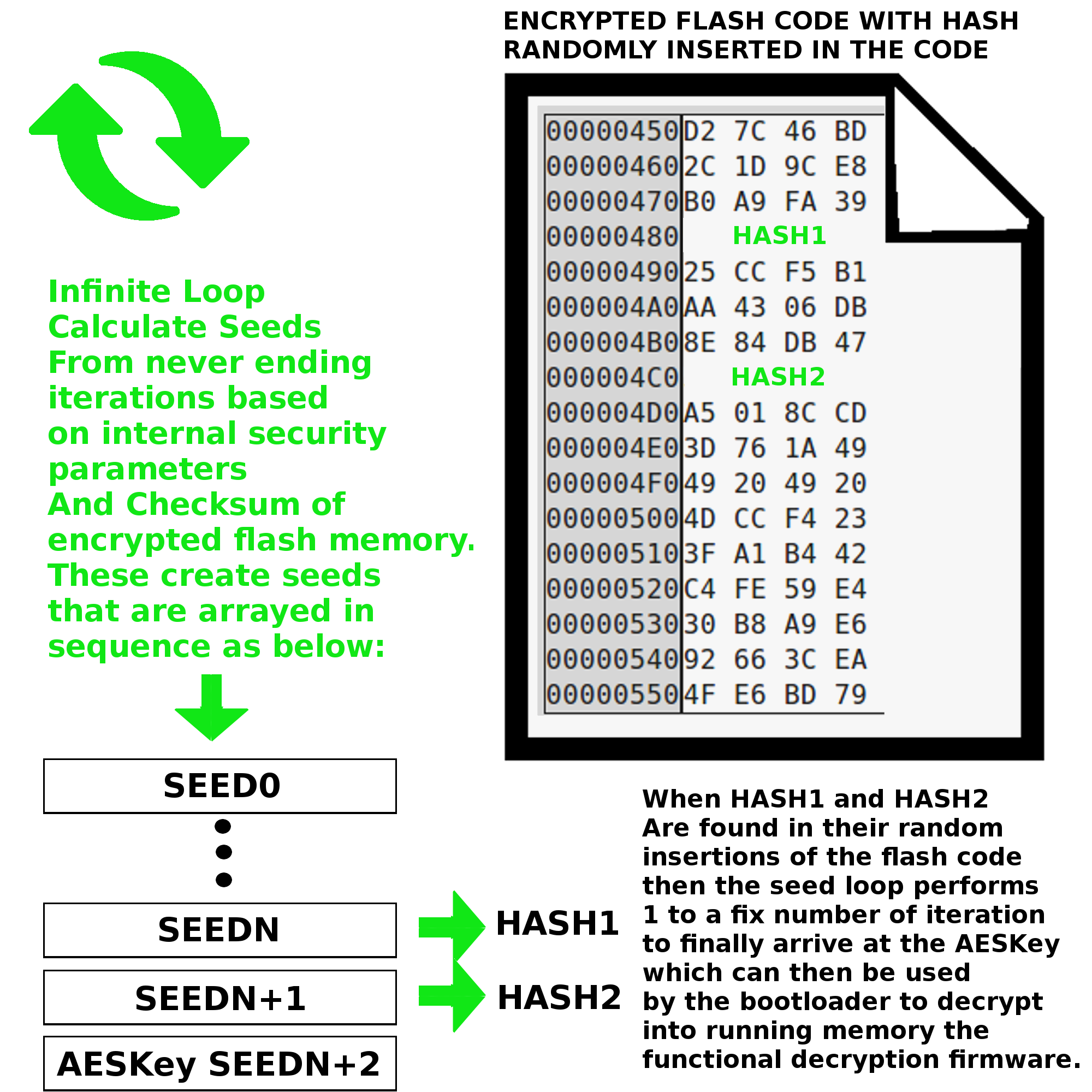
People ask how our algorithm works, we cannot and will not give the full details. We do not claim our algorithm is 100% bullet proof, but like a key and lock does not hold off a determined thief, it does dissuade the common thief. So one way we protect your firmware is by creating random seeds from security and unique ID bits. To avoid the common decompiler astute from finding seeds even if the algorithm is known but the security and unique ID is not known, we do a while loop that drops out only when it finds two consequetive HASH of the seeds also in the scanned flash memory. This is very important that these hash will be placed to look totally random location in the AES encrypted firmware. Only when these HASHes are found will it exit a fixed number of iterations later to give away the true AESKey to unencrypt internal to the iram of the internal chip. |
|
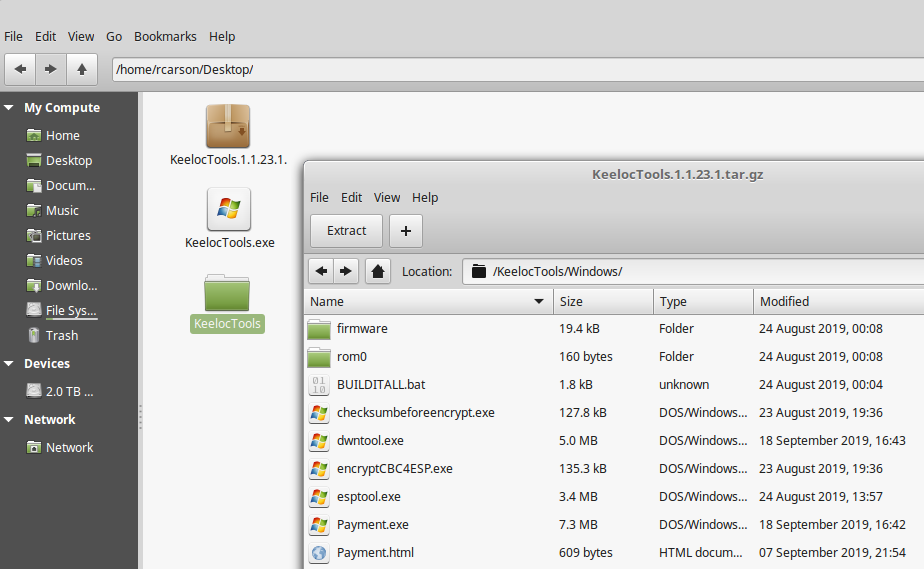
So far we presented all the tools from a Linux box, if you wish to run the Windows executables to do the same thing proceed down the Windows directory as shown below: |
|
Finally we wish to talk how to seal and protect via pin destruction of the USB serial pin port. This is done by writing firmware that every time it first boots ups the ESP8266 will turn high in voltage value and low impedance (the serial pins) at the same time shorting out these pins by block circuit to ground. You only do this however once the encrypted firmware has properly loaded using our serial upload tools. By not allowing access to the serial port, your attacker will have no access to the internals of your chip including the security unique identifier ID bits of your ESP8266. This does however present a problem that the firmware at this point will be fixed and unchangeable with the esptools. So if you wish to do field upgradable firmware or to reprogram using the esptools later, or a need to use the serial debugger after release to manufacturing for your product then our solution will not allow you to totally protect from hijacking because this will be a vector of attack to read the chip contents used in our sercuity alogirthm bootloader. It will still add a layer of hardship, but much less protection than if you seal off the access by fusing the USB serial port pins. |